Evelyne: Integrating a Modern Script Font into Your Design Workflow
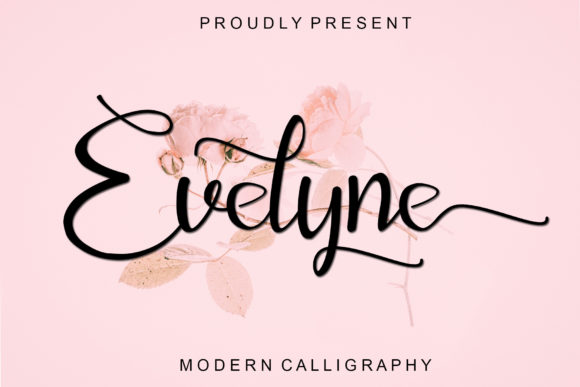
When you're working on a project that requires a personal, handwritten touch, the font you choose is a critical component of the final outcome. It's not just about aesthetics; it's about finding a tool that fits seamlessly into your process, from initial concept to final delivery. Evelyne, a modern script font from Letterafa, is designed to be that tool. Its flowing, sweet-looking letters offer a distinct personality that can elevate various design projects, but its true value lies in how effectively you can integrate it into your workflow.
Understanding Evelyne's Role in a Project Lifecycle
Think of a design project as a series of stages: planning, asset gathering, execution, and review. Evelyne isn't just a final-stage asset you drop in; its characteristics can influence decisions made earlier. For instance, if you're planning a brand identity for a boutique bakery or a wellness coach, the sweet, approachable nature of Evelyne's script can inform your entire visual direction. Knowing you have a font with this specific personality helps you select complementary imagery, color palettes, and supporting typefaces during the planning phase. This foresight prevents the common problem of finding a perfect font late in the process and having to backtrack to adjust other elements.
During the execution phase, the practical features of a font become paramount. Evelyne is PUA encoded, which is a technical detail with significant workflow implications. PUA (Private Use Area) encoding means that all the extra glyphs, swashes, and stylistic alternates are accessible directly through your operating system's character map or font management software, not just within advanced design applications. This means a small business owner creating their own packaging in a basic design program can access the same decorative elements as a professional designer using Adobe Illustrator. This democratizes high-quality design, making Evelyne a versatile asset across different skill levels and software environments.
Practical Implementation: From Selection to Final Output
Integrating a new font like Evelyne into your toolkit requires a bit of preparation to ensure it works for you, not against you. The first step is organization. When you download the font, take a moment to install it properly and, if possible, add it to a designated font library or collection in your management software. Label it clearly—for example, "Script - Evelyne - Letterafa." This simple act of organization saves considerable time later when you're searching for the right font under a deadline.
Next, consider compatibility and testing. Before committing Evelyne to a large project, run a quick test. Open a document in your primary design or word-processing tool and type out the alphabet, numbers, and common punctuation. Check how the letters connect and flow. Type out the specific words or phrases you anticipate using most often for your project—perhaps a business name or a tagline. This test ensures the font renders as expected in your environment and helps you spot any potential readability issues with certain letter combinations early on.
Workflow Integration Examples
For Greeting Cards and Invitations: The process here is linear but benefits from planning. Start by drafting your copy—the heartfelt message or event details. With your text ready, you can then apply Evelyne to the headline or key phrases. Use the swashes and alternates to add flair to the first or last letter of a word, but do so with restraint to maintain legibility. The PUA encoding is your friend here; use the Character Viewer on Mac or the Character Map on Windows to browse and insert these special characters directly. This is often faster than using glyph panels within design software for simple projects.
For Brand Identity and Logo Design: Here, Evelyne would likely be a display font, used sparingly for impact. Your workflow would involve creating the logo in a vector-based program for scalability. You might pair Evelyne with a clean, sans-serif font for body text to create hierarchy and ensure readability across applications—from a website header to a business card. The key is consistency. Once you select the specific alternates and swashes for the logo, document those choices. Create a simple style guide note stating which characters you modified so that any future use of the brand name remains uniform.
For Package Design and DIY Projects: This is where Evelyne's sweet look can truly shine, and where its ease of use is critical. Imagine designing labels for homemade jams or candles. You might be working in a program like Canva, Adobe Express, or even a dedicated label-making app. Because Evelyne is PUA encoded, you can access its full range of characters within these platforms. A practical tip: design your label template with placeholder text first. Once the layout, imagery, and other text are set, you can then input your final text using Evelyne, adjusting the swashes to frame the product name or highlight a key ingredient without disrupting the overall design structure.
Ensuring Quality and Long-Term Use
Quality control is a non-negotiable part of any professional process. When using a script font like Evelyne, pay close attention to kerning—the spacing between individual letters. While the font is designed to flow, certain letter pairs (like "Ty" or "be") might need manual adjustment in your design software to look perfect, especially at larger sizes. This is a standard step in typographic work and ensures a polished, professional result.
Long-term use of any asset depends on versatility and licensing. Evelyne is suited for a range of applications, but always verify the font license from Letterafa to ensure your intended use—whether for a personal blog, a commercial product, or client work—is covered. For freelancers and agencies, maintaining an organized library of licensed fonts like Evelyne is part of responsible asset management. It prevents legal issues and streamlines future projects where a similar aesthetic is required.
Ultimately, a font is a tool. Evelyne's value is realized when it solves a specific design problem: the need for a personal, sweet, and flowing script that is also practical to implement. By considering it early in your planning, testing it in your environment, and applying it with attention to typographic details, you can make Evelyne a reliable and effective part of your creative toolkit. It’s about moving from simply having a font to strategically using it to achieve a consistent and high-quality outcome across your work.