Nymphette: Integrating Delicate Symbolism into Your Design Workflow
In the world of digital typography, the utility of a font is often judged by its readability and aesthetic appeal. However, there is a specific category of typography that serves a different, more decorative purpose: dingbats. Among these, Nymphette, a dingbats font created by Lauren Thompson, stands out as a unique asset. It is not a font for writing paragraphs of text; rather, it is a curated collection of symbols designed to inject style, elegance, and visual hierarchy into your projects. Understanding how to effectively integrate a resource like Nymphette into your workflow can save time and elevate the quality of your output, whether you are designing a wedding invitation, building a brand identity, or creating educational materials.
Understanding the Asset: What is Nymphette?
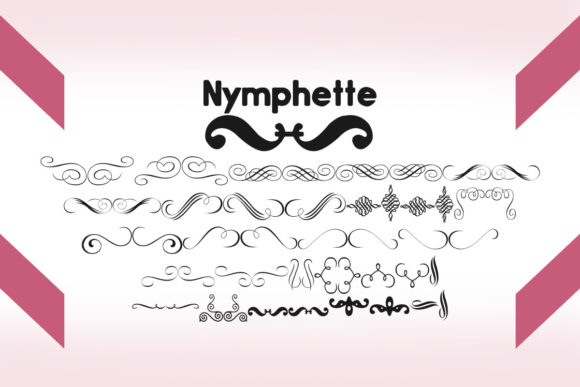
Nymphette is a specialized font file containing a series of delicate, ornamental symbols. When you type a standard letter on your keyboard while this font is active, the output is not a letter but a graphical symbol. These symbols typically range from intricate floral motifs and vines to hearts, swirls, and other decorative elements. For professionals and hobbyists alike, this offers a distinct advantage over searching for vector images or clipart. By treating these symbols as a font, you gain the ability to resize them without losing quality, change their color instantly using standard text color tools, and align them perfectly with other typographic elements.
The utility of Nymphette lies in its versatility. It functions as a bridge between typography and graphic design. It is particularly useful in scenarios where you need small, repeatable design elements that must maintain consistency across a layout. Because the symbols are rendered as text, they are lightweight and easy to manage within word processors, design software, and web builders.
Preparation and Organizational Strategy
Before diving into a project, it is essential to establish a system for managing your assets. A common bottleneck in the creative process is locating the right resource at the right time. When you download Nymphette, the immediate challenge is often remembering which key corresponds to which symbol.
A practical implementation tip for workflow efficiency is to create a "key map" or a reference sheet. Open a blank document, activate the Nymphette font, and type out the alphabet and numbers. Print this out or save it as a PDF pinned to your desktop. This simple act of preparation eliminates the need to guess which letter creates the swirl you need during the heat of design, significantly speeding up your execution.
Furthermore, consider how this font interacts with your existing library. Nymphette works best when paired with clean, legible serif or sans-serif fonts. When planning a project, identify your primary typeface for body text and your secondary accent font. Nymphette will likely serve as the tertiary element—used for borders, bullet points, or section dividers. By defining these roles early in the planning phase, you ensure that the final design feels cohesive rather than cluttered.
File Management and Installation
Efficiency starts with file management. When installing Nymphette, ensure it is installed system-wide so it is accessible across all your applications—from Adobe Creative Suite to Microsoft Word and Canva. If you work in a team environment, syncing this font across shared computers ensures that layouts do not break when files are transferred. This attention to compatibility is a crucial step in the quality control process.
Implementation in Creative Workflows
Integrating Nymphette into your workflow requires a shift in thinking. Instead of viewing it as a font, view it as a vector toolkit accessible via your keyboard. Here is how you can apply this resource across various stages of a project.
Phase 1: Conceptualization and Mockups
During the early stages of a project, such as brainstorming a logo or laying out a flyer, speed is more important than polish. Nymphette allows you to quickly drop in visual markers without interrupting your flow to browse stock image sites. If you are drafting a menu, for example, you can use Nymphette symbols to represent different categories (e.g., a leaf for vegan options, a heart for house favorites). This allows you to visualize the final density of the page before committing to complex graphic work.
Phase 2: Design Execution and Refinement
Once the structure is set, Nymphette becomes a tool for refinement. Its delicate nature makes it perfect for adding texture to negative space.
- Borders and Dividers: Instead of using a standard horizontal rule, type a string of Nymphette characters to create a decorative border. By adjusting the letter spacing (tracking) in your design software, you can create seamless, elegant dividers for certificates or invitations.
- Custom Bullet Points: Standard bullet points can be sterile. In reports, presentations, or resumes, replacing them with a Nymphette symbol can add a touch of personality without sacrificing professionalism.
- Ornamental Typography: Use the symbols as decorative caps or flourishes at the beginning of chapters or blog posts. This adds a high-end feel to the layout.
Phase 3: Quality Control and Consistency
As you finalize your design, consistency is key. Because Nymphette is a font, it adheres to the same kerning and leading rules as your text. This makes it easier to align elements perfectly compared to floating image objects. During the review process, check that the visual weight of the symbols matches the tone of your project. If the text is bold, a thin, delicate Nymphette symbol might get lost; conversely, in a light, airy design, the symbols will shine.
For Event Planners and Stationery Designers
For those in the wedding or stationery industry, Nymphette is a powerhouse. It can be used to create monograms, frame text on RSVP cards, or add subtle embellishments to envelopes. The workflow here involves setting the text first, then overlaying the Nymphette symbols in a contrasting color or opacity to create depth.
For Digital Marketers and Content Creators
In digital marketing, visual hierarchy guides the reader's eye. Use Nymphette symbols in email headers or social media graphics to break up text blocks. Because the symbols are text-based, they load faster than heavy image files, contributing to better page speed and user experience. When creating a "listicle" style post, using these symbols as visual anchors can increase engagement.
For Educators and Administrators
Teachers and administrators often need to create worksheets, newsletters, and certificates. Nymphette provides a library of clipart-style images that are easy to insert into Word documents. This eliminates the need for complex image licensing or editing software, streamlining the process of creating engaging materials for students.
Long-Term Use and Asset Maintenance
Like any tool, the value of Nymphette increases as you become more familiar with its capabilities. Over time, you will memorize the key commands for your favorite symbols, integrating them seamlessly into your muscle memory.
However, it is important to practice restraint. A design cluttered with too many dingbats can look amateurish. The goal of using Nymphette is to enhance, not overwhelm. A good rule of thumb is to use these symbols to support the message, not replace it. When reviewing your work, ask yourself if the symbol adds clarity or just adds noise.
Finally, consider the licensing and usage rights. Lauren Thompson has provided this font for personal use, but always verify the license if you plan to use it in commercial products for resale. Keeping a record of your font licenses is a best practice for any freelancer or business owner to avoid legal headaches later.
Conclusion
Nymphette is more than just a collection of pretty pictures; it is a functional design tool that bridges the gap between text and imagery. By preparing your environment, mapping your symbols, and applying them with intention, you can leverage this font to solve layout problems and add a layer of sophistication to your work. Whether you are drafting a business proposal or designing a scrapbook, integrating Nymphette into your workflow offers a simple, effective way to elevate your visual communication.